Skip to content

Theme

Get in touch
PunchTrack App Icon
Now on the App Store

PunchTrack

Camera-powered punch counter

Turn your iPhone into a coach for solo heavy-bag boxing. Stand it to your side and the camera counts every punch, right on the phone. It rings the rounds, calls the combos and films the session so you can watch it back. No wearables, no straps, and your videos never leave your iPhone unless you share them.

Download on the App Store
New in version 2.0

PunchTrack now counts with the camera.

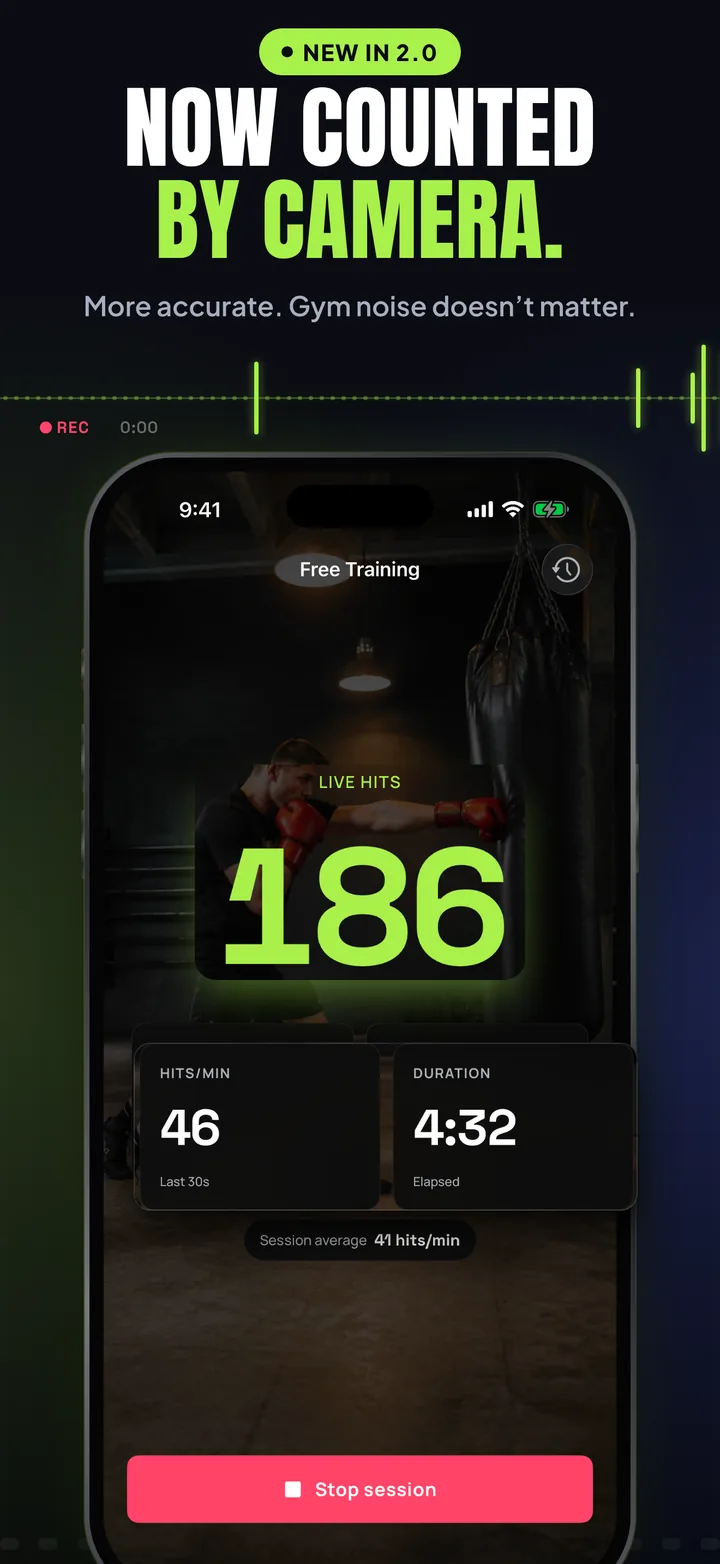
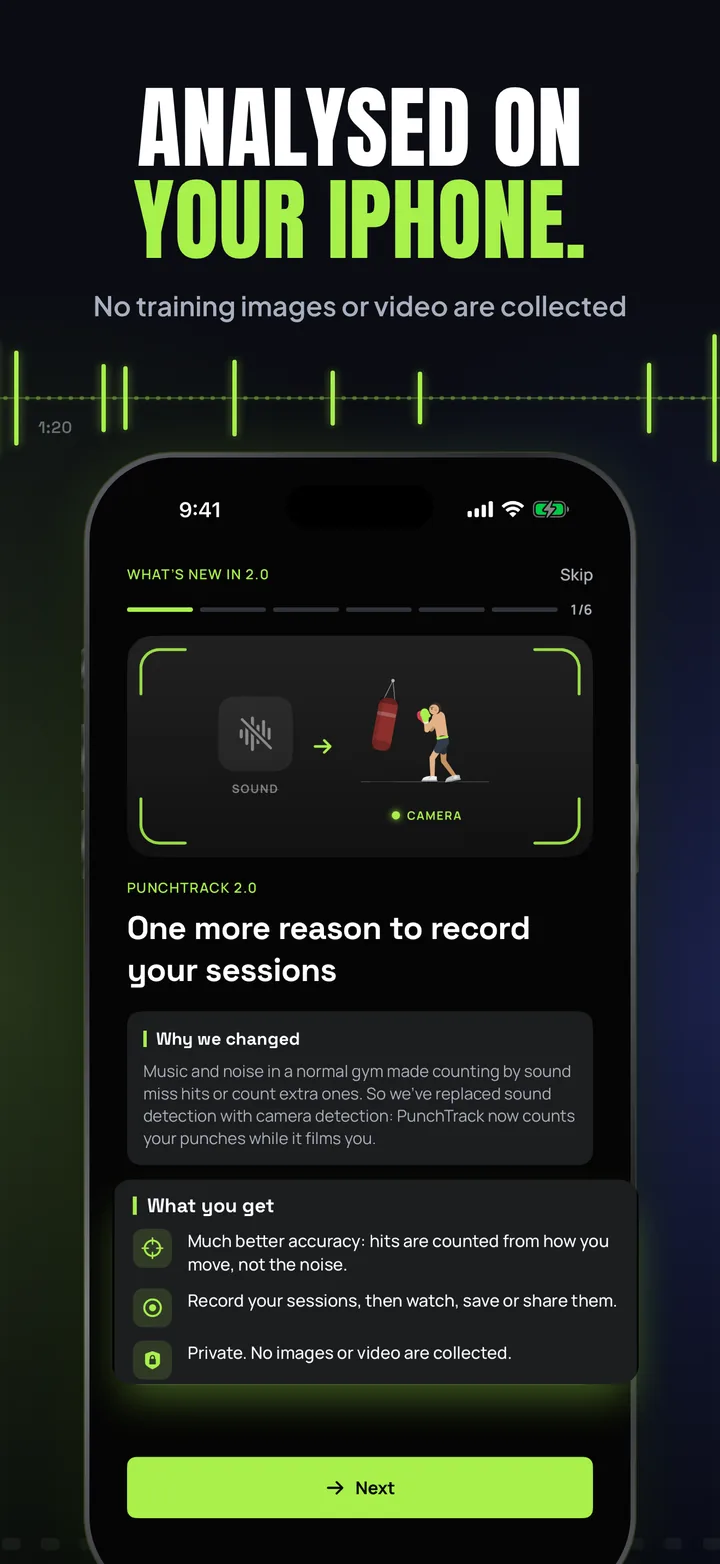
One more reason to record your sessions: PunchTrack 2.0 counts your punches while it films you. Counting by sound could miss hits or add extra ones in a busy gym, so 2.0 watches your arms instead. It’s more accurate, and gym noise and music don’t matter anymore. The video is analysed on your iPhone, and no images or video of your training are collected; it’s kept in the app for three days (or longer, if you choose) to watch, save or share. A camera guide shows you where to stand the phone, and Season 1 leaderboards start fresh with camera-counted punches.

  • Camera counting
  • Session videos
  • Session details on videos
  • Camera guide
  • Season 1 leaderboards

Free · iOS 16.0 or later

Get the update

App Information

Quick facts about PunchTrack for iOS

DeveloperCS42
PriceFree
CategoryHealth & Fitness
CompatibilityiOS 16.0 or later
LanguagesEnglish
Age Rating13+
In-App PurchasesNone
AccountOptional, free
Data CollectedOnly with an account
CameraRequired. Processed on your iPhone
Session VideosKept on your iPhone, never uploaded
Works OfflineYes. Training works offline

About PunchTrack

What is PunchTrack?

PunchTrack turns your iPhone into a coach for solo heavy-bag boxing. Stand your phone to your side, start training, and the camera counts every punch in real time, with no wearables. It rings the rounds, calls the combos and tells you when to rest, so you never have to look at the screen, then hands you a video of the session to watch back. The picture is analysed on your iPhone, and your videos stay there unless you save or share them. Train fully offline, or create a free account to back up your progress, follow friends and climb the Season 1 leaderboards.

Read more Show less

PunchTrack follows your body with Apple's on-device body tracking. It learns where each hand rests in your guard and counts a punch when the hand shoots out and comes back: jabs, crosses, hooks and uppercuts, lead and rear. Footwork and moving your head don't count. Because it watches your arms instead of listening for the bag, music and gym noise no longer get in the way.

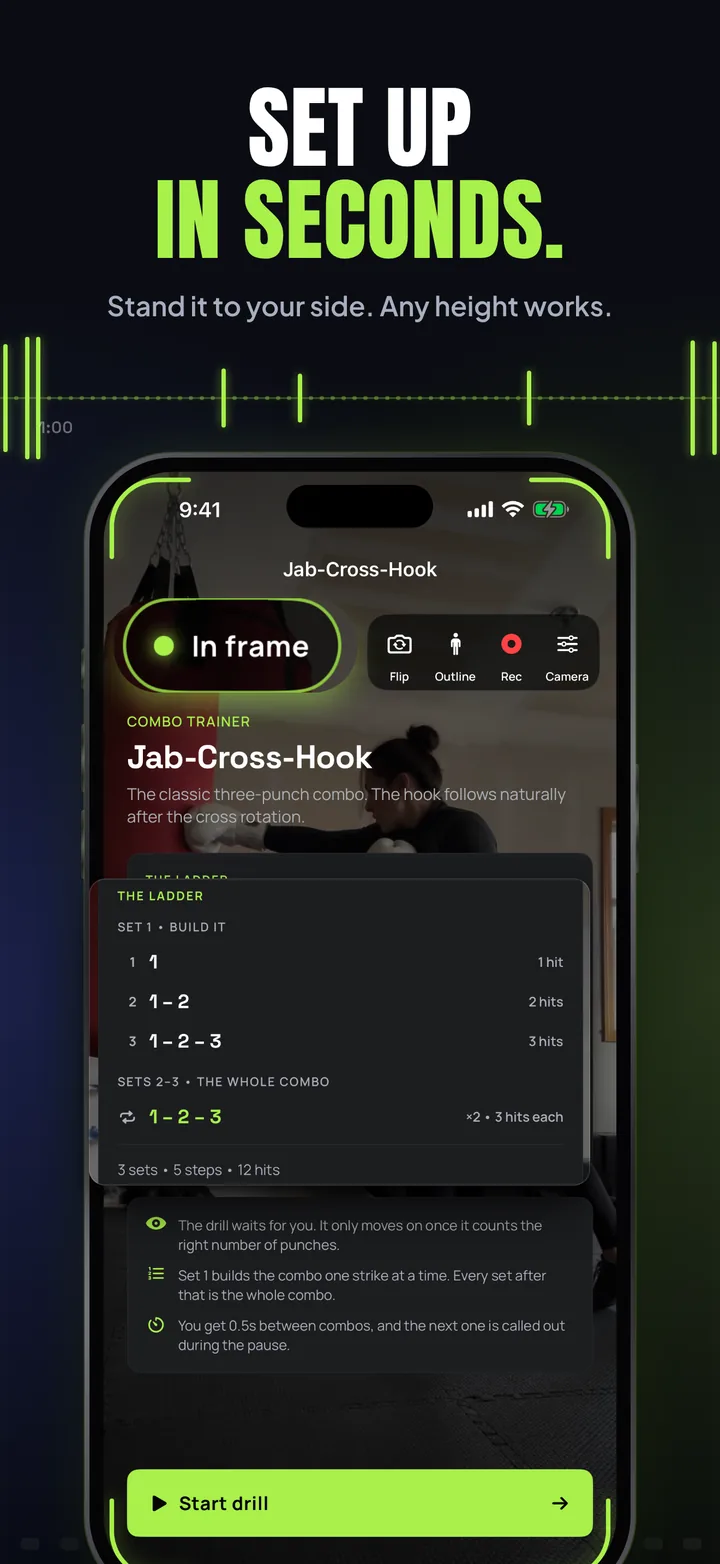
Set-up takes a few seconds. Stand the phone to your side, 2 to 3 metres away, at any height, as long as the bag and the space you move in are in the picture. Before you start you see the full camera view with viewfinder corners that light up and an “In frame” pill once PunchTrack has found you. During the round the picture fades behind your timer and counts, as see-through as you like, with an optional body outline on top.

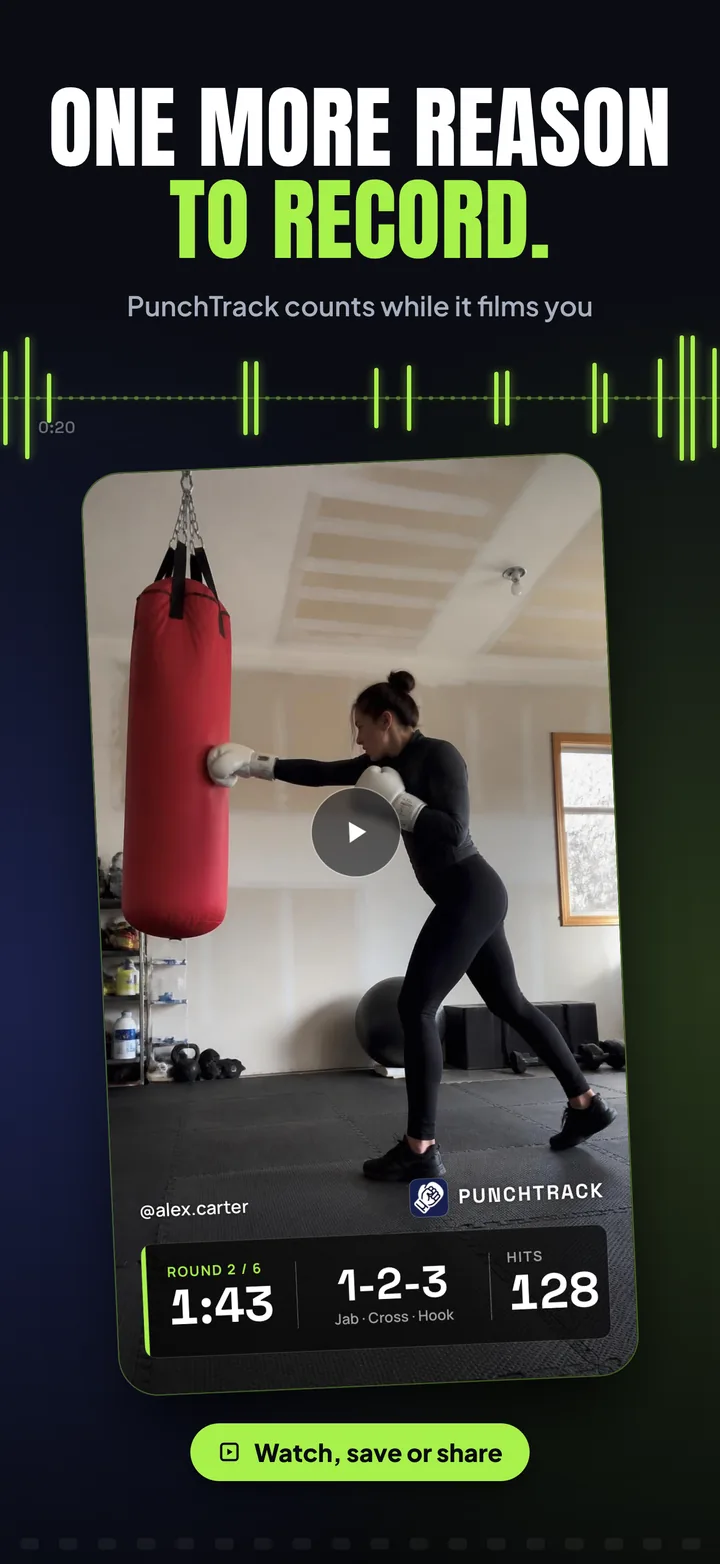
Every session is filmed by default, with sound: bag thuds, bells and the gym. Videos are kept in PunchTrack for three days, a week, or until you delete them, and you can save any of them to Photos or share it. Videos you save or share can carry the session details along the bottom, like a broadcast: the round and timer, the combo and your hit count, plus your username and photo if you switch them on. The PunchTrack name and logo are always included. Nothing is uploaded by the app.

Because the phone stands away from you, sound still carries the coaching. One bell starts a round and a double bell ends it, a clapper marks the last ten seconds, and rest ends with a spoken round call and a 3-2-1. Cues mix over your own music instead of pausing it. Every one of them has its own switch in Sound & Haptics.

Key Features

📷

Counted by Camera

On-device body tracking counts each punch from how your arm moves, lead and rear, in real time. Busy gyms and loud music don't throw it off.

🎬

Session Videos

Every session is filmed with sound and kept on your iPhone for 3 days, a week or until you delete it. Watch it back, save it to Photos or share it with the session details on screen.

🥊

Free Training

Start a session, hit the bag, and watch your live punch count and hits per minute, with a video of the session waiting at the end.

🎯

Guided Workouts

Six coached routines from beginner to brutal, or build your own. Each round is timed, with a start bell, a double bell at the end, and spoken combination callouts.

🔢

Combo Trainer

Set 1 builds each combination one strike at a time; every set after that throws the whole combo. Each step waits for the right number of hits. In Muay Thai mode, kicks, knees and elbows count themselves after a beat.

🏆

Challenges & 1v1

Race the clock in Sprint and test your reflexes in Reaction. Or go head to head: pass the phone for a round-by-round 1v1, or a Hit Challenge where the most hits takes each round. Every way to start a session lives in the Train tab.

🌍

Season 1 Leaderboards

Create a fighter card, follow friends, and battle for the weekly and all-time top spots, globally, in your country, or among people you follow. Season 1 counts camera punches only, so everyone starts level.

📊

Progress & Achievements

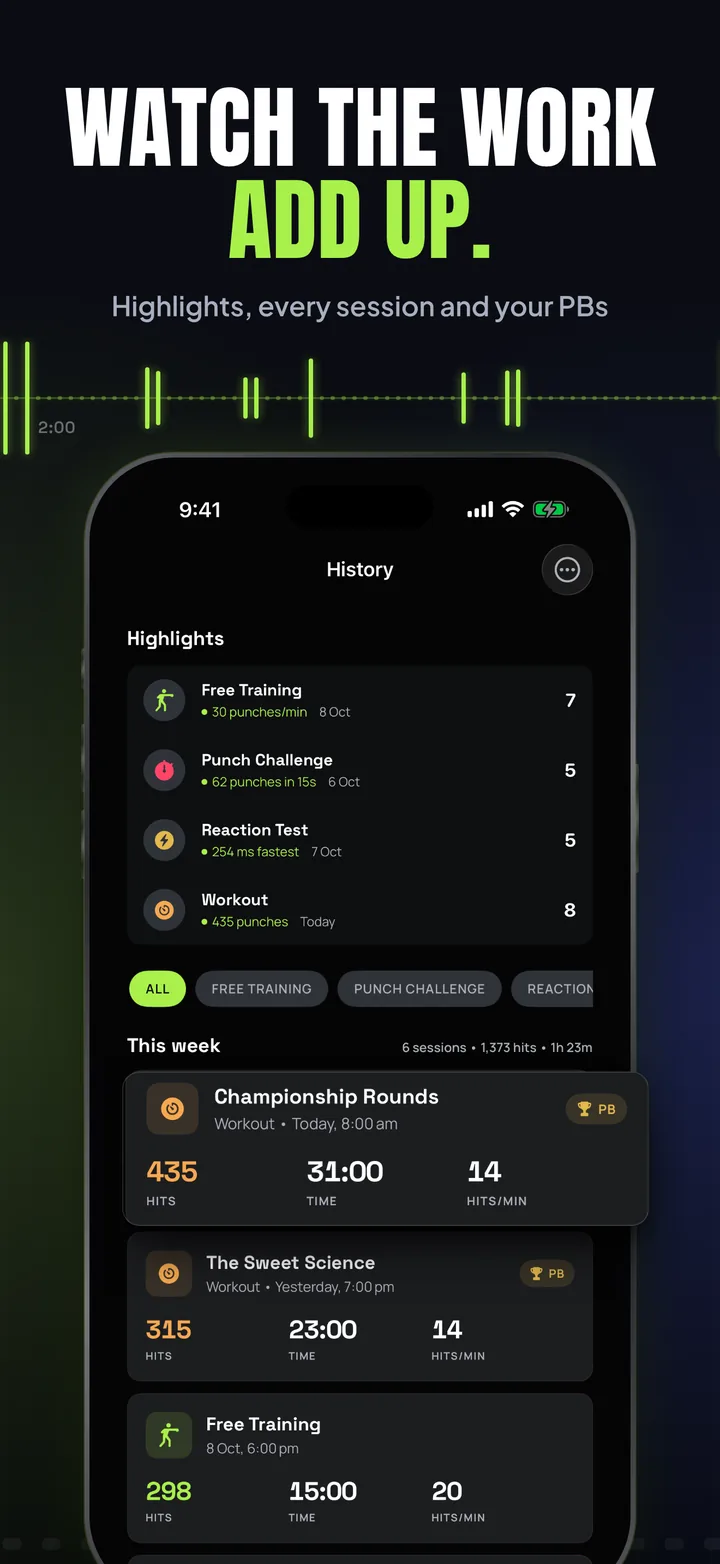
Weekly activity rings for sessions, hits and minutes. Charts for punch volume, cadence and reaction times, a seven-day trend card, a training-log calendar, streaks, personal bests and a trophy case.

📬

Notifications

A bell on the Train and Social tabs gathers new followers (with Follow back), your latest sessions and badges, and notes from CS42. Share any of them in a tap.

⚖️

Fair Play

Leaderboards should only count real training. CS42 can remove a workout that looks fake, and tells you why with a note in the app.

🛡️

Private by Design

The camera picture is analysed on your iPhone, and your videos and their sound stay there unless you save or share them. No analytics or ad SDKs, no tracking.

More

  • Camera guide. A short walkthrough shows where to stand the phone, how to get “In frame”, how to throw punches that count, and what happens to your video. Open it again any time from Profile → Training → Camera & Video → Camera guide.
  • Camera & Video settings. Front or back camera, the body outline, how see-through the picture is during a round, recording and sound, and which session details go on your videos. Under Advanced: sensitivity, motion blur, battery saver, video quality and frame rate, the ultra-wide lens (0.5×) for tight spaces, and how long videos stay.
  • Session Videos. Every kept video in one list under Profile → Training → Session Videos. Save to your library, or to a PunchTrack album if you allow full Photos access.
  • Cloud backup & sync. An optional free account keeps your profile, sessions and settings safe and in sync across devices. Videos are never part of it.
  • Quick start. The Train tab opens with a card that continues your last workout in one tap.
  • Sound & Haptics. Sound effects, combo callouts, round announcements, a tick on every punch, cue volume with previews, Trash Talk and vibration, each with its own switch. Find it under Profile → Training → Sound & Haptics.
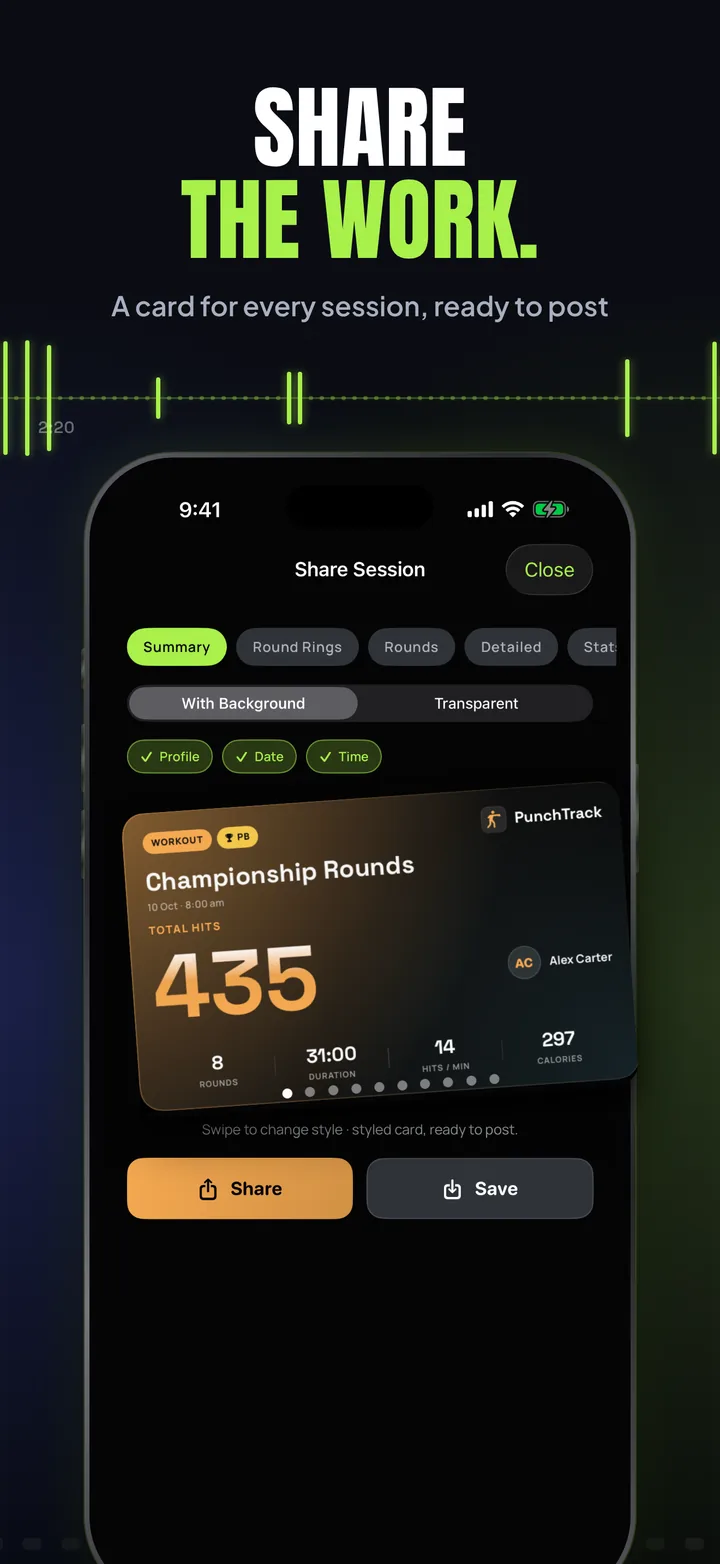
  • Share cards. Turn any session into a poster-grade card, with or without a transparent background and a gold PB chip on personal bests, and share it to your story or save it to Photos.
  • Apple Health. Optionally save workouts and estimated calories to the Health app (write-only).
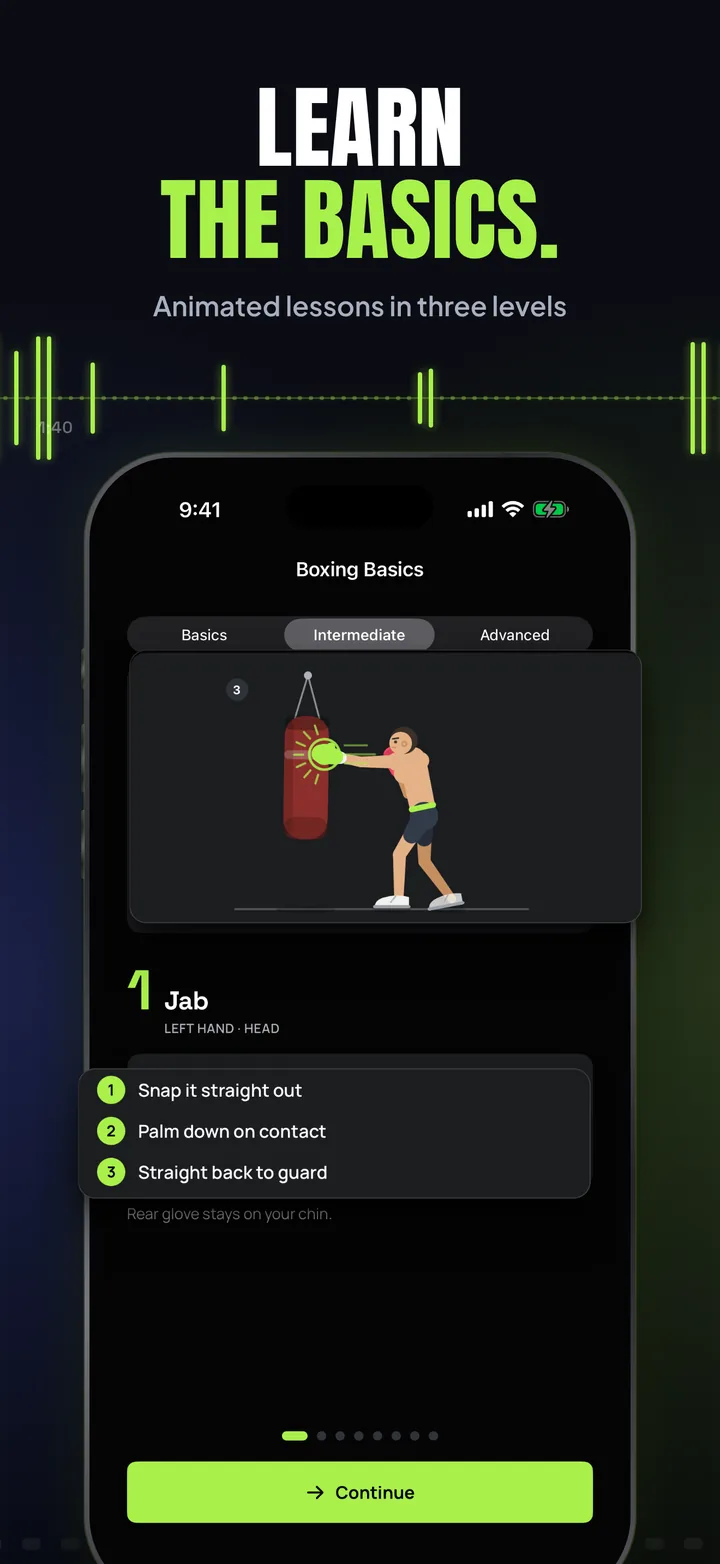
  • Boxing Basics guide. Animated lessons in three levels, from stance and guard to body shots, uppercuts and slips, plus a full punch guide that adapts to your stance.
  • Train to your own music. Spotify, Apple Music or a podcast keeps playing; bell cues and combo callouts mix over the top instead of pausing it.
  • Trash Talk (Hype Mode). When you go quiet on the bag, the app fires a spoken taunt to push you back into it. Turn it off or change the silence threshold under Profile → Training → Sound & Haptics → Trash Talk.
  • Orthodox or Southpaw. Every workout, drill and lesson adapts to your stance, and PunchTrack can spot your lead hand automatically when you stand side-on.
  • Seven themes. Kinetic, Midnight, Forest and Mono for dark, Daylight, Coastal and Sand for light, plus five app icon designs.
  • Metric or imperial. Weights and heights in the units you think in.
  • Training reminders. An optional nudge to train and a weekly recap, scheduled on your device.
  • Backup file export. Take your profile and history with you as a portable backup file, account or not.

Screenshots

The 2.0 App Store set is one continuous picture, so keep swiping.

New in 2.0, now counted by camera: Free Training over the camera picture with 186 live hits, 46 hits a minute, 4 minutes 32 in.
One more reason to record: a saved session video with the round, timer, combo and hit count along the bottom.
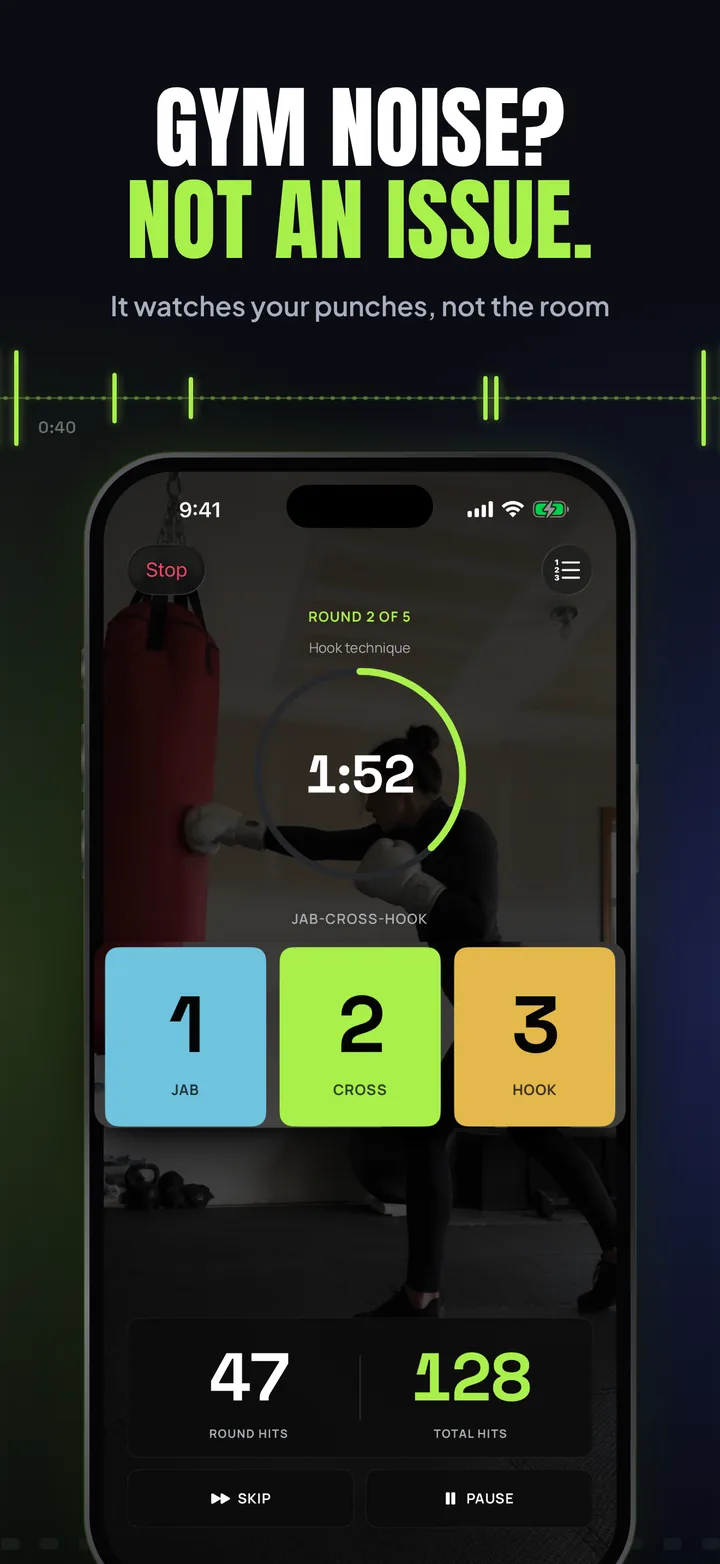
Gym noise? Not an issue: a workout mid-round over the camera, 1:52 left, with the jab, cross and hook combo tiles.
Set up in seconds: the camera set-up screen saying In frame, with the Jab-Cross-Hook combo ladder.
Analysed on your iPhone: the 2.0 announcement, with better accuracy, recorded sessions, and no images or video collected.
Learn the basics: a Boxing Basics lesson on the jab, with an animated boxer at the bag.
Watch the work add up: highlights and this week's sessions with personal bests.
Share the work: a session card with 435 total hits, ready to post.
PunchTrack 2.0, every punch counted by camera: the app icon with better accuracy, session videos, on your iPhone and no wearables.

Swipe or scroll sideways: each panel picks up where the last one ends.

Make it yours

Seven themes, four dark and three light. Pick one of each and let Auto follow your device.

Kinetic True black, electric lime
Midnight Deep navy, warm amber
Forest Deep pine, brushed gold
Mono Pure black, clean white
Daylight Paper white, burnt orange
Coastal Sea mist, ocean teal
Sand Warm sand, forest green

Terms & Conditions

Effective date: 10 October 2026 · Version 2 · Accepted in the app before first use

These Terms are an agreement between you and CS42, the owner and operator of PunchTrack. By tapping Accept & Continue or using the app, you agree to them and to our Privacy Policy. If you don’t agree, don’t use PunchTrack. Read the full terms →

Read full terms Show less

The short version

  • Camera access is only for counting your punches, on your iPhone. No images or video from your training are collected or uploaded, and CS42 never sees them.
  • PunchTrack is owned and run by CS42. CS42 administrators can view accounts (profiles, workout records and settings) to run the app, give support and keep the community safe.
  • Suspicious or fake records may be deleted, and CS42 can remove content and suspend or delete accounts that break these Terms.
  • Film only where it’s allowed, and ask before you share a video that shows someone else.
  • You train at your own risk. Counts and calories are estimates.

This summary is for convenience; the full Terms below are what apply.

1. Who we are

PunchTrack is owned and operated by CS42 (cs42.org). “CS42” includes the people it authorises to run the app (“CS42 administrators”).

2. Your account

An account is optional. If you create one, give accurate information, keep your sign-in secure and don’t share it. You must be at least 13, and if you are under 18 a parent or guardian must agree to these Terms with you. You are responsible for what happens on your account.

Usernames aren’t property: CS42 may reset or reclaim any username, for example one that impersonates someone or is offensive. You can delete your account at any time in Profile → Account → Delete Account.

3. Community rules

No impersonation, harassment, spam, or unlawful, hateful or sexual content, including in usernames, names and photos.

Zero tolerance for objectionable content and abusive users. You can block or report anyone from their profile. We aim to act on valid reports within 24 hours by removing the content and ejecting the user responsible. Contact us any time at hello@cs42.org.

4. Fair play

Workouts, scores, statistics and leaderboard entries must come from your own real training. Don’t fake, script, copy or tamper with them.

CS42 may delete records that look suspicious, fake or manipulated, and will send you a note in the app when it does. If it happens again, CS42 may suspend or delete the account.

5. CS42’s rights

By accepting these Terms you give CS42 these rights:

  • Access. CS42 administrators may view any account and its data (account details, profile, workout records, settings, follows, blocks and reports) to run and support the app, investigate reports, prevent cheating and abuse, keep users safe, enforce these Terms and comply with the law.
  • Moderation. CS42 may hide, edit or remove any content, including usernames, photos, fighter cards, records and leaderboard entries.
  • Accounts. CS42 may warn, restrict, suspend or delete any account that breaks these Terms or harms others, with or without notice.
  • The app. CS42 may change, suspend or discontinue any part of PunchTrack at any time.

If you think we got a decision about your account wrong, email hello@cs42.org.

6. Your content

You own what you add to PunchTrack. You give CS42 a worldwide, royalty-free licence to host, store, process and display it to run, secure and moderate the app, including showing what you make public (like your fighter card) to other users. The licence ends when you delete the content or your account, apart from backups kept for a limited time or copies the law requires us to keep.

7. Camera and session videos

Camera access is used only for detection on your iPhone. PunchTrack uses the camera to count your punches, and that happens entirely on your device. CS42 does not collect, upload, store or view any image or video from your training. The only picture PunchTrack ever uploads is a profile picture you choose to add.

PunchTrack also films your sessions unless you turn recording off in Camera & Video settings. Videos stay on your iPhone and are never uploaded to CS42; they leave the app only if you save or share them. The Privacy Policy explains how long they’re kept.

  • Film only where it’s allowed. Follow the rules of your gym or club and the law where you train.
  • Respect the people in view. Tell anyone in the frame that you’re filming, and get their permission before you save or share a video that shows them.
  • What you share is your responsibility. Shared videos follow the community rules in section 3 and the terms of wherever you post them. They carry the PunchTrack name and logo; don’t use them to suggest CS42 endorses you.

8. Acceptable use

Don’t reverse-engineer the app, access other people’s accounts or our systems, scrape data, or use PunchTrack unlawfully or commercially without our permission. All rights in the app belong to CS42; you get a personal, revocable licence to use it.

9. Health and safety

Training carries a risk of injury and you take part at your own risk. Check with a doctor before starting, wear wraps and gloves, and place your phone where it can’t be hit or trip anyone. PunchTrack is not a medical device or a replacement for coaching, and its punch counts, reaction times and calories are estimates.

10. Privacy

Our Privacy Policy explains what we collect and who can see it, including the administrator access in section 5.

11. Apple

These Terms are between you and CS42, not Apple. Apple is not responsible for the app, its support or any claims about it. Your licence covers Apple devices you own or control under the App Store Usage Rules, and you confirm you are not in a U.S.-embargoed country or on a U.S. restricted-party list. Apple and its subsidiaries are third-party beneficiaries of these Terms and may enforce them.

12. Disclaimers and liability

The app is provided “as is”, without warranties. To the fullest extent the law allows, CS42 is not liable for indirect or consequential losses, lost data, or injuries from training, and its total liability is limited to USD 50. Nothing here limits liability the law doesn’t allow us to limit.

13. Changes, ending and law

We may update these Terms; for a material change the app will ask you to accept again. You can stop using PunchTrack and delete your account at any time, and CS42 may end your access under section 5. These Terms are governed by the laws of the country where CS42 is established, without removing consumer rights you have where you live.

14. Contact

CS42 · cs42.org · hello@cs42.org

Effective date: 10 October 2026 · Version 2

Privacy Policy

Effective date: May 2, 2026 · Last updated: October 10, 2026 (PunchTrack 2.0)

The camera counts your punches on your iPhone. PunchTrack reads your body position frame by frame, on the device, and keeps only the punch count. Session videos stay on your iPhone. Sessions are filmed by default, with sound, and kept inside the app for 3 days (or the time you choose); they are never uploaded and leave the app only if you save or share them. You can use PunchTrack entirely without an account, in which case your data never leaves your device and you have no public presence. If you create an optional free account, your training data is backed up to our cloud so you can sync across devices, and your fighter card (handle plus headline stats) is discoverable by default so friends can find you. One tap in Profile turns that off, and your session details, age, weight, and height stay private unless you switch them on. Authorised CS42 administrators can view account data to run the service, give support, and keep the community safe (Section 9). No ads, no third-party analytics, and we never sell your data. Read the full policy →

Read full privacy policy Show less

What changed in PunchTrack 2.0. Punches are now counted by the camera instead of by sound, sessions are filmed and kept on your iPhone (Section 4), and the microphone is used only for the sound in those videos. Sessions you saved with earlier versions keep the details they were saved with.

CS42.org ("we", "us", "our") built the PunchTrack app as a free application. This section explains what data the App handles, where it goes, and the controls you have over it.

1. Two Ways to Use PunchTrack

  • Without an account ("Continue without account"). Everything (profiles, sessions, statistics, settings and session videos) is stored only on your device. Nothing is sent to our servers, and we collect no personal data at all.
  • With a free account. Sign up with an email address and password, or with Sign in with Apple. Your training data is then backed up and synced to our cloud (see Section 2) and you can take part in the social features (see Section 3). Creating an account is always optional. Punch detection, workouts, drills, and analytics work fully offline either way.

2. Information We Collect (Account Users Only)

When you create an account, the following is stored in our cloud database, linked to your account. Only you can change it, except that authorised CS42 administrators can remove a workout that looks falsified and send you a note about it (Section 9). It can be read by you and, for the purposes in Section 9, by those administrators (see Section 8 for how it is protected):

  • Account data. Your email address and your chosen unique username. Passwords are handled by Firebase Authentication; we never see or store your plain-text password. With Sign in with Apple, Apple provides a verified (optionally relayed) email address. We also record which version of the Terms & Conditions you accepted, and when.
  • Notes from CS42, messages we send you in the app, such as a notice that a workout was removed.
  • Fighter profiles, name, stance, and any optional fields you choose to fill in: gender, date of birth, weight, height, nationality, country of residence, Instagram/TikTok handles, and profile photo.
  • Training data, session records (type, date, duration, punch counts, hits per minute, workout/drill details, including player names you type for 1v1 matches, and whether the camera or, for sessions saved by earlier versions, sound counted the punches) and reaction-drill statistics. Sessions saved by earlier versions keep any power breakdown they were saved with.
  • App settings, such as your themes, sound and haptics, goals, reminders and sharing choices, so they follow you across devices. We also store a copy of your camera and recording settings (such as which camera, detection sensitivity and video quality) and your app version for support; it is not applied to your other devices.
  • Not your videos. Session videos and their sound are never part of your account data. They are not uploaded, synced or included in backups (Section 4).

Sync is local-first: your device remains the source of truth, and changes are written through to the cloud when you are online.

3. Social Features & What Other Users Can See

The social features apply to accounts only. If you use PunchTrack without an account, you have no public presence of any kind and nothing in this section applies to you.

When you create an account you choose a unique username. From that point your public fighter card is discoverable by default, so other signed-in athletes can find you by your handle and see you on leaderboards. The app tells you this on the screen where you choose your username, and you can turn discoverability off at any time in Profile → Data & Privacy → Discoverability, doing so deletes your public card immediately.

Your fighter card shows: your username and display name, profile photo, nationality and residence flags, Instagram/TikTok handles (if you added them), headline training stats (total punches, punches counted by the camera, session count, streak, best punches-per-minute, this week's punches), the athletes you follow, and when you were last active. Instagram/TikTok handles appear while “Share social links” is on (on by default).

You stay in control:

  • Discoverability toggle. On by default for accounts; turn it off and your card is removed, so other users cannot find or view it.
  • Recent sessions. Sharing of your recent session summaries (up to the last 10) is off by default and has its own toggle.
  • Age, weight, and height. Each is off by default with its own sharing toggle, and is only shown if you enable it.
  • Leaderboards. Show your username, flag, and punch totals to other signed-in users while you are discoverable. From PunchTrack 2.0 the leaderboards (Season 1) rank only punches counted by the camera.
  • Block & report. You can block other users and report inappropriate profiles; reports you submit are stored so we can act on them.

Public fighter cards are visible only to signed-in PunchTrack users, not on the open web.

4. The Camera, Session Videos & Sound

Counting punches. In PunchTrack 2.0 the camera counts your punches. Here is exactly how it works:

  1. When you set up a session, the App opens the camera you chose (front or back) so you can frame yourself and the bag.
  2. Each frame is analysed on your iPhone by Apple's Vision framework, which finds the position of your body (shoulders, elbows, wrists and so on). Nothing is sent anywhere for this.
  3. From those positions the App works out when a punch is thrown and which hand threw it. Only the result (the punch count and the session details) is kept in your session record.
  4. Frames are not kept for counting. The only pictures PunchTrack keeps are your session video, if recording is on (below).
  5. When the session ends, the camera stops.

PunchTrack no longer counts punches by sound. The microphone is not used for detection at all.

Session videos. PunchTrack films your sessions so you can watch them back:

  • On by default. Each session is filmed by the camera that counts your punches and saved inside the PunchTrack app on your iPhone. You can film only workouts, or turn recording off, in Profile → Camera & Video.
  • Kept for 3 days by default. You can choose 1 week, or until you delete them, in Camera & Video → Advanced. After that time a video is deleted from the app automatically, and you can delete any video sooner in Session Videos.
  • Never uploaded. Videos are not sent to CS42 or Firebase, are not part of your cloud backup or your .ptbackup export, and other users can never see them. A video leaves the app only when you choose to save it to your photo library or share it with the iOS share sheet; what happens to it there is governed by the app or person you share it with.
  • Session details. If you turn on “Add the session details”, videos you save or share carry a bar with the PunchTrack name and logo and the details you pick: timer and round, combos, hit count, and, only if you choose them, your username and profile picture.
  • Other people. Anyone in view of the camera can appear in your videos. Please let them know you are filming, and ask before you save or share a video that shows them (see the Terms & Conditions).

Sound in your videos (microphone). PunchTrack uses the microphone only to record sound with your session videos, such as bag thuds, the bell and the gym:

  • Sound is on by default. The App asks for microphone access when you set up a session that will be filmed. If you refuse, or turn “Record sound” off in Camera & Video, videos are recorded silently and everything else works the same.
  • The sound is saved only inside the session video, on your iPhone, and follows the video rules above. It is never uploaded or analysed.
  • If a phone call or Siri takes the microphone, the video keeps recording without sound, and the sound comes back when the call ends.

5. Camera and Photo Library

PunchTrack 2.0 needs camera access to count your punches (Section 4); without it, the training modes cannot count. You can also use the camera, or a photo from your library, to set a profile picture. The photo is stored with your profile on your device; if you are signed in it is included in your cloud backup, and it appears on your public fighter card while your account is discoverable. You can skip the profile picture entirely and revoke these permissions at any time in iOS Settings.

When you save a session video or share card to your photo library, the App asks for permission to add to it. This permission only allows adding, not reading your library. The optional “Save to a PunchTrack album” setting keeps the videos you save together in an album; iOS lets an app make an album only with full photo library access, so the App asks for that access only if you turn this setting on. PunchTrack never reads, uploads or analyses the rest of your library.

6. Apple Health (Optional)

If you enable the Apple Health integration, PunchTrack writes your boxing workouts and estimated active calories to Apple Health. The App requests write-only access: it never reads any data from Apple Health, and your Health data is never sent to our servers. You can revoke this at any time in the Health app or iOS Settings.

7. Notifications (Optional)

Training reminders (a daily streak nudge and a Sunday weekly summary) are local notifications scheduled on your device. We do not send push notifications and no server is involved.

The Notifications screen inside the app (the bell on the Train and Social tabs) is not a push service either. Your device builds it from information this policy already covers: the public fighter cards of people who follow you (Section 3), your own sessions and badges, and notes CS42 sends to your account (Section 2). The list of badges you unlocked and when you first saw each follower are kept on your device only.

8. Where Your Data Is Stored & Service Providers

Cloud data for account users is stored with Firebase (Firebase Authentication and Cloud Firestore), a Google LLC service. Firebase processes this data on our behalf on Google Cloud infrastructure, which may be located in various countries. Data is encrypted in transit (TLS), and security rules ensure that only you can change your account data (apart from the workout removals and notes described in Section 9), and that only you and authorised CS42 administrators (Section 9) can read it. See Firebase's privacy documentation for details.

Firebase is our only service provider. We do not use any advertising networks or third-party analytics SDKs, and we do not sell, rent, or share your personal data with anyone else.

9. Access by CS42 Administrators

PunchTrack is operated by CS42. To run the service and keep it safe, authorised CS42 administrators can view the data of any account: account details (email address, username, sign-in method, and the Terms version you accepted), fighter profile details, training and session records, app settings, and social data such as follows, blocks, and reports. They use it only to:

  • provide support and fix problems with your account or your data;
  • investigate reports and suspected breaches of our Terms & Conditions, and moderate content;
  • prevent fraud, leaderboard cheating, abuse, and security incidents;
  • meet legal obligations and respond to lawful requests.

Administrators can view this data, and can delete a workout that looks falsified; when they do, you receive a note in the app explaining why. Access is limited to specific CS42 administrator accounts that our database security rules recognise, and is never used for advertising or sold. Decisions such as removing content or suspending an account are taken under our Terms & Conditions. If you use PunchTrack without an account, your data never leaves your device, so there is nothing for an administrator to see. Where data-protection law such as the GDPR applies, we rely on our legitimate interest in operating a safe, working service, and on legal obligations where they apply; you can object or ask questions at hello@cs42.org.

10. Permissions Summary

Permission Required? Purpose
Camera Yes Count your punches on your iPhone and film your session videos, which stay in the app and are never uploaded. Also used if you take a profile picture.
Microphone No Record sound with your session videos. On by default; you can turn it off. Never used to count punches, never uploaded.
Photo Library No Used if you choose a profile picture from your library, or turn on the PunchTrack album for saved videos.
Add to Photo Library No Save the session videos and share cards you choose to export. Cannot read your library.
Apple Health No Write-only: saves workouts and estimated calories to Apple Health. Never read.
Notifications No Local training reminders you schedule. No push notifications.

11. Analytics, Advertising & Tracking

PunchTrack contains no advertising and no third-party analytics or tracking SDKs. The only third-party components are Firebase Authentication and Cloud Firestore, used purely for sign-in and data sync. We do not "track" you in the sense defined by Apple's App Tracking Transparency framework. There is no cross-app or cross-website tracking, so the App Tracking Transparency prompt is never shown.

12. Children's Privacy

PunchTrack's training features are suitable for all ages, but creating an account and using the social features is not intended for children under 13 (or the minimum age for such services in your country). We do not knowingly collect personal information from children under 13; if you believe a child has created an account, contact us and we will delete it. Younger athletes can use the App without an account, in which case no data is collected, and we recommend adult supervision when training on a heavy bag and when recording session videos.

13. Data Retention & Deletion

You can delete your data at any time:

  • Delete your account, Profile tab → Account → Delete Account. This permanently removes your cloud data (account, profiles, sessions, follows and blocks, notes from CS42, public fighter card, and username) and erases the app's data, including session videos, from your device.
  • Sign out. Signing out removes your profiles, sessions, settings and session videos from the app on that device (a cached copy can stay in the app's storage until you sign in again or delete the app); your cloud copy is restored the next time you sign in.
  • Without an account, deleting individual profiles in the app, or deleting the app itself, removes all locally stored data. Nothing exists on any server.
  • Session videos are kept in the app for 3 days by default (or 1 week, or until you delete them, if you choose), then deleted automatically. Deleting the app also deletes them. Videos you saved to your photo library or shared stay where you put them.

We retain cloud data only for as long as your account exists. Two kinds of moderation record are kept after an account is deleted: reports filed by or about the account, and a note of any workout CS42 removed (account and workout IDs and the date only), so that we can finish acting on them and keep a record of moderation decisions. You can also export a full backup of your data (a .ptbackup file) from the app at any time.

14. Your Rights

If you use PunchTrack without an account, we hold no data about you. If you have an account, you can exercise your rights directly in the app: access and export your data (backup export), correct it (edit your profile), and delete it (Delete Account). If you are in a jurisdiction with applicable privacy laws (GDPR, CCPA, and similar), you may also contact us at the address below to exercise these rights, object to processing, or lodge a complaint with your supervisory authority.

15. Data Security

Local data, including session videos, is protected by iOS's app sandbox and device encryption. We recommend keeping your device updated and using a passcode or biometric lock. Cloud data is encrypted in transit and protected by security rules, so other users can never read your private data; only you and authorised CS42 administrators (Section 9) can. Authentication is handled by Firebase Authentication; we never store plain-text passwords.

16. Apple App Store

When you download PunchTrack from the App Store, Apple may collect certain information as described in Apple's Privacy Policy. This data collection is governed by Apple and is outside our control.

17. Changes to This Policy

We may update this Privacy Policy from time to time. We will notify you of any changes by posting the new policy on this page and, if the change is material, mentioning it in the app's release notes. You are advised to review this Privacy Policy periodically.

18. Contact Us

If you have any questions or concerns about this Privacy Policy, contact us at hello@cs42.org.

Last updated: October 10, 2026 (PunchTrack 2.0)

Support

Need help with PunchTrack?

If you encounter any issues, have suggestions for new features, or need help setting up the camera, reach out to us:

View FAQ Hide FAQ

How does PunchTrack count punches now?

With the camera, from version 2.0. Apple's body tracking runs on your iPhone, finds where your hands rest in your guard, and counts a punch each time a hand shoots out and comes back. Earlier versions listened for the bag through the microphone, but music and noise in a busy gym made them miss hits or add extra ones. Watching your arms fixes that.

Where should I put my phone?

To your side, 2 to 3 metres away, on a stand or propped firmly so it can't move. Any height works, as long as the bag and the space you step in and out of are in the picture. Wait for the corners to light up and the pill at the top to say In frame, then start. Face the light if you can: a bright window behind you hides your arms. Short on space? The back camera's ultra-wide lens (0.5×) fits more in, under Profile → Training → Camera & Video → Advanced. The camera guide walks through all of this and opens from Camera & Video → Camera guide.

Why does PunchTrack need camera access?

The camera is how it counts. The picture is analysed on your iPhone and is never uploaded. Without camera access PunchTrack can't count punches.

Does PunchTrack record me? Where do the videos go?

Yes, by default each session is filmed, with sound, so you can watch it back. The video is kept inside PunchTrack on your iPhone for 3 days, a week, or until you delete it (your choice, under Camera & Video → Advanced). It is never uploaded. It only leaves the phone if you save it to Photos or share it yourself. Turn recording or sound off any time in Profile → Training → Camera & Video. Videos are also deleted when you sign out or delete your account. Filming in a gym? Make sure the people in view are OK with it.

Why does it ask for the microphone?

Only to record sound with your session videos. Punches are counted by the camera, not the microphone. If you say no, videos are simply silent. If a phone call or Siri takes the microphone mid-session, the sound comes back when it ends and counting carries on.

It misses punches, or counts too many.

  • Check you're in frame. Your whole body and the bag should be in the picture, with the pill saying In frame.
  • Throw full, clean punches. Extend, then bring the hand back to guard. Turn on the body outline to see what PunchTrack sees.
  • Adjust Sensitivity. Missing light punches? Move it toward “Counts lighter punches”. Counting extras? Move it the other way. It's in Profile → Training → Camera & Video → Advanced.
  • Mind the light. In a dim gym, face the light or set Motion blur to Standard.
  • One athlete at a time. PunchTrack follows one person. Keep the picture to yourself where you can.

Do I need an account?

No. Choose "Continue without account" and everything stays on your device. A free account adds cloud backup, sync across devices, and the social features (fighter cards, following, leaderboards). You can add an account later at any time. Videos are never backed up or synced.

Does PunchTrack need an internet connection?

No. Punch counting, videos, workouts, drills and analytics all work fully offline. If you have an account, your data syncs to the cloud whenever you're back online.

What happened to the leaderboards?

Version 2.0 starts Season 1. The weekly, country and all-time boards now rank punches counted by the camera, so everyone competes on the same footing. Your history and lifetime totals from earlier versions are all still there.

What can other users see about me?

Nothing at all if you train without an account. With an account, once you pick a username your fighter card is discoverable by default so friends can find you: username, display name, photo, flags, and headline stats, visible to signed-in users only. Your recent sessions and your age, weight, and height are off by default. Each has its own toggle. To disappear completely, switch off Profile → Data & Privacy → Discoverability and your card is deleted straight away. You can also block or report any user. Other users never see your videos unless you share one yourself. Authorised CS42 administrators can view account data for support, safety and moderation, as the Privacy Policy explains.

Where do I see who followed me?

Tap the bell at the top of the Train or Social tab. Notifications lists new followers (with a Follow back button), your recent sessions and newly unlocked badges, and any notes from CS42, grouped into New, Today, Yesterday, This week and Earlier. Filter it to Followers or Your activity, and share a session, a badge or your fighter card straight from the list. Followers need an account; your own sessions and badges show up either way. These are in-app notifications, not push notifications.

What is the Combo Trainer?

A combination drill that watches you. Set 1 builds the combo one strike at a time: step one is a single punch, land it and step two adds the next, until you're throwing the whole thing. Every set after that is the full combo, start to finish. Each step waits for the right number of hits, so you can't outrun it. You choose how many sets to run and how long it holds between steps, and with voice callouts on, the pause stretches so the app finishes naming the next combo first. Find it under Train → Combos.

Does PunchTrack do Muay Thai?

The Combo Trainer does. Switch the style to Muay Thai for combinations with elbows, knees and kicks, each called out by name. The camera follows your hands, so punches are counted as usual and kicks, knees and elbows count themselves after a beat. The rest of the app (workouts, drills, 1v1) remains boxing-based.

Can I listen to music while I train?

Yes. Start your music as usual and PunchTrack keeps counting, because counting uses the camera. The round bell and combo callouts mix over your music instead of pausing it, and opening a session video doesn't stop it either: the video's own sound only plays when you press play.

The app said something rude to me. What was that?

That's Trash Talk (Hype Mode), a gym-style taunt the app plays when you stop punching for a while, to push you back onto the bag. It's banter aimed at you, not at anyone else. To turn it off or change how long the silence has to be first, go to Profile → Training → Sound & Haptics → Trash Talk.

Can I turn the bells, voice or vibration off?

Yes, each one separately. Profile → Training → Sound & Haptics has switches for sound effects (bells, beeps and chimes), combo callouts, round announcements ("Round 2", "Last round", "Rest"), a tick on every punch, and vibration, plus a cue volume slider with previews so you can hear the level before a session. The pulse on every hit is off by default, because mid-session the phone is on its stand, away from you.

How do I switch between Orthodox and Southpaw?

Profile tab → Edit Profile → switch the Stance toggle. Workouts and lessons adapt to your stance. When you stand side-on, PunchTrack can also tell your lead hand automatically (Camera & Video → Advanced).

Why do I have to accept the Terms again?

Version 2.0 updates the Terms & Conditions for the camera and session videos, so everyone accepts them once more. They lead with the main point: camera access is only for counting your punches, on your iPhone, and no images or video from your training are collected or uploaded. A new section covers filming: film only where it's allowed, and ask people in view before you share a video. Read them any time under Profile → Data & Privacy → About → Terms & Conditions. If you don't agree and you're signed in, the same screen lets you sign out, or delete your account and its data.

A workout disappeared and I got a note from CS42.

To keep leaderboards fair, CS42 can remove a workout that looks fake, scripted or impossible. It's deleted from your history and totals on every device you sign in to, and you get a note saying why: it pops up the next time you open the app and stays in Notifications. If it happens again, the account may be suspended or deleted (section 4 of the Terms). Think we got it wrong? Email hello@cs42.org.

How do I delete my data?

Without an account, delete a profile in the app or delete the app itself. Nothing is stored on any server. With an account, go to Profile → Account → Delete Account: this permanently removes your cloud data and account, and wipes the app's data and videos from your device. Signing out also removes your data and videos from that device.

Does it work on iPad?

PunchTrack is an iPhone app for now. It's designed around a phone standing next to your heavy bag.

We typically respond within 48 hours.