Passport Photos App Icon

Coming soon to the App Store

Passport Photos

Passport & visa photos, framed right

Take passport, visa and ID photos at home that meet the rules. Line yourself up with an outline of the face and shoulders, and the app frames the photo to the official head-size rules for 28 countries and formats, then saves an exact-size print, a print sheet for your paper, or the file an online application asks for. Nothing leaves your iPhone.

Not out yet. Leave your email below and we'll send one message on launch day.

Version 1.0 · Coming soon

Line up with the outline.

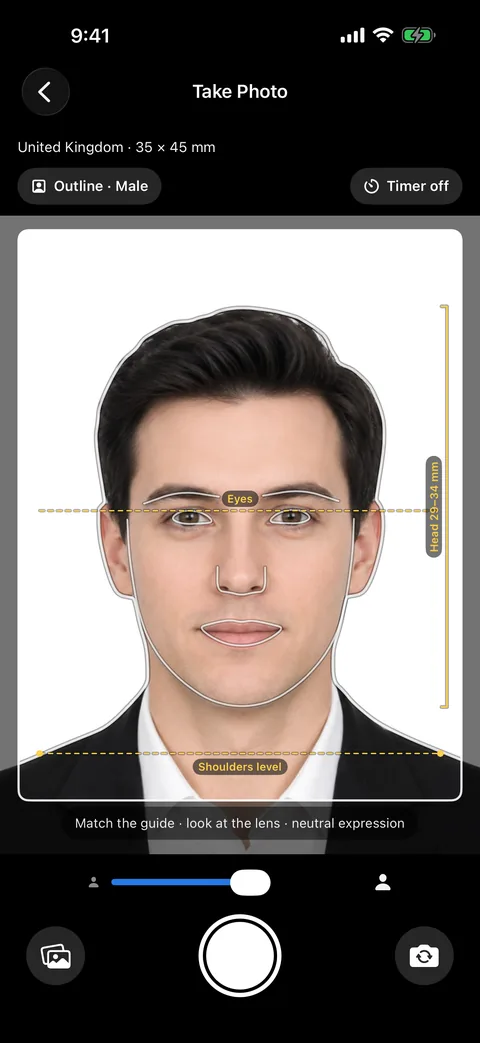
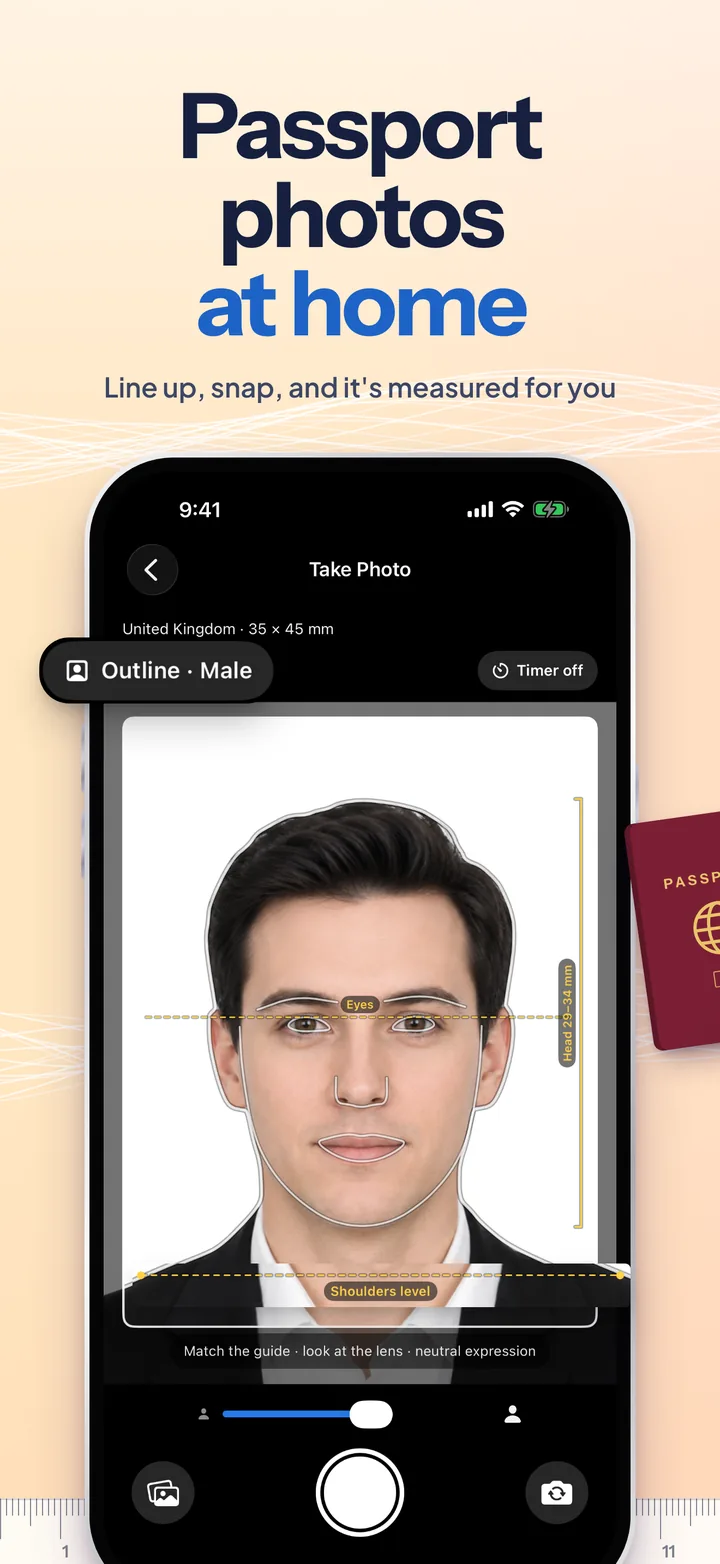
The camera draws a reference person as clean lines: hair and head, jaw, eyes, neck and shoulders, with an eye line, a shoulders-level line and a bracket showing exactly how tall your head should be for the format you picked. Match the lines and the photo is already most of the way to compliant. Every one of the 28 formats was checked against the issuing authority's own rules in September 2026.

  • Outline pose guide
  • 28 verified formats
  • Head-size auto-fit
  • Background colours
  • Light presets
  • Print sheets & online files

About Passport Photos

What is Passport Photos?

Passport Photos turns your iPhone into a passport-photo booth. Pick the country or document, line yourself up with the outline guide, and take the picture, or import one you already have. The app measures your face, crops the photo so your head is the size the authority asks for, checks the framing rule by rule, and hands you an exact-size print, a sheet for your photo paper, or the file an online application wants. Photos never leave your iPhone.

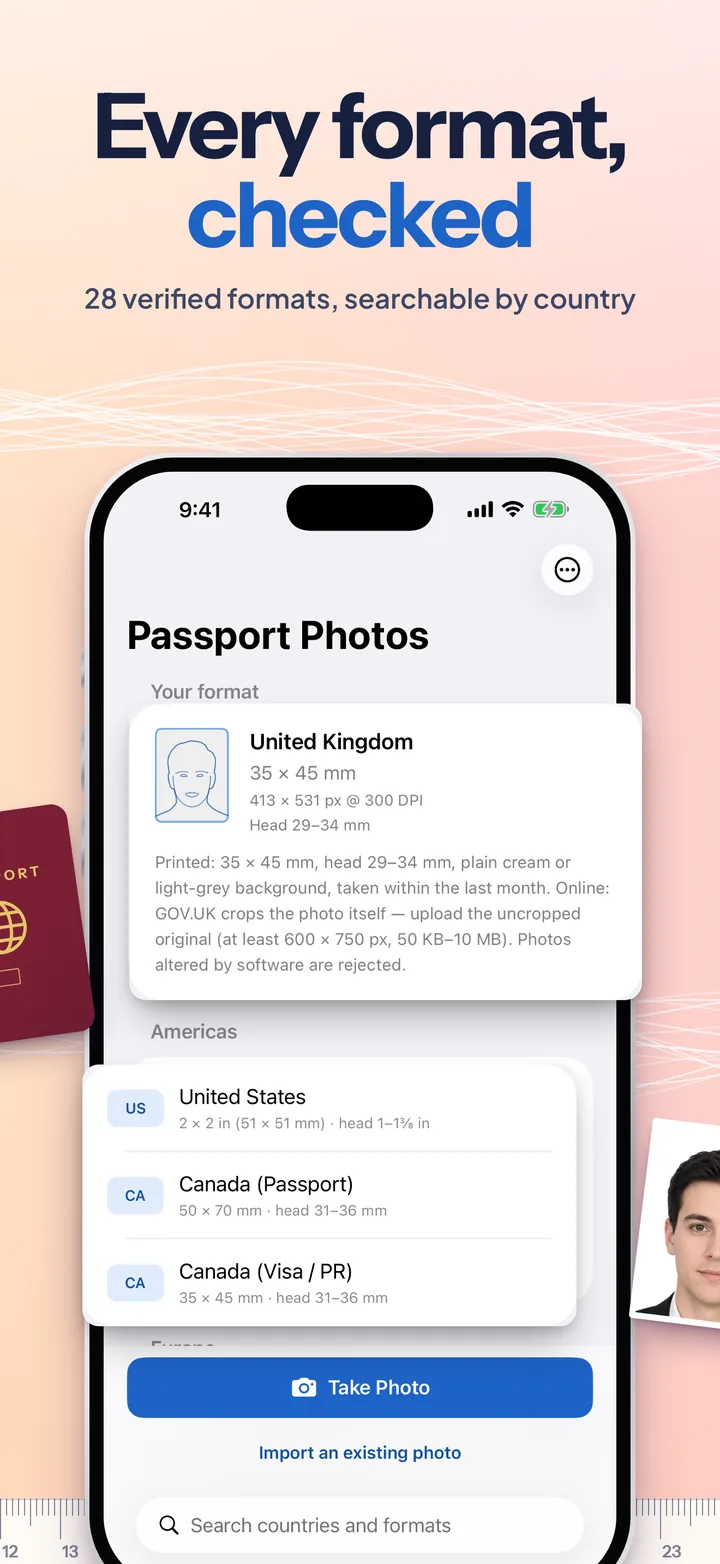
Most rejected passport photos fail on framing, not on the face: a head a few millimetres too big, a crown cut off by the top edge, eyes too low on a square US photo. Passport Photos is built around getting that right. Each format carries the authority's own numbers: the photo size, the chin-to-crown head height, and, where one is published, the eye band or the space above the head (China wants 3 to 5 mm, Japan 4 ± 2 mm).

After you take the photo, one on-device Vision pass finds your eyes, chin and head tilt, and uses person segmentation to find the true top of your hair, which is where authorities measure from. Guessing the crown from the face box, as simpler apps do, makes heads come out 7 to 12% too big: enough to fail the UK and EU maximums. The crop is then fitted automatically, and you can pinch and drag while the checklist updates live.

Where an authority says it rejects digitally altered photos (the US, UK, EU, Canada, Australia and others), the background and light tools still work but tell you so, and the export repeats the warning only if you actually edited the photo.

Screenshots

The App Store set is one continuous picture, so keep swiping.

Passport photos at home: the camera with the outline guide over a man, with the eye line, the shoulders-level line and the UK head-size bracket.
Every format, checked: the home screen with the United Kingdom format card and the list of formats by region.
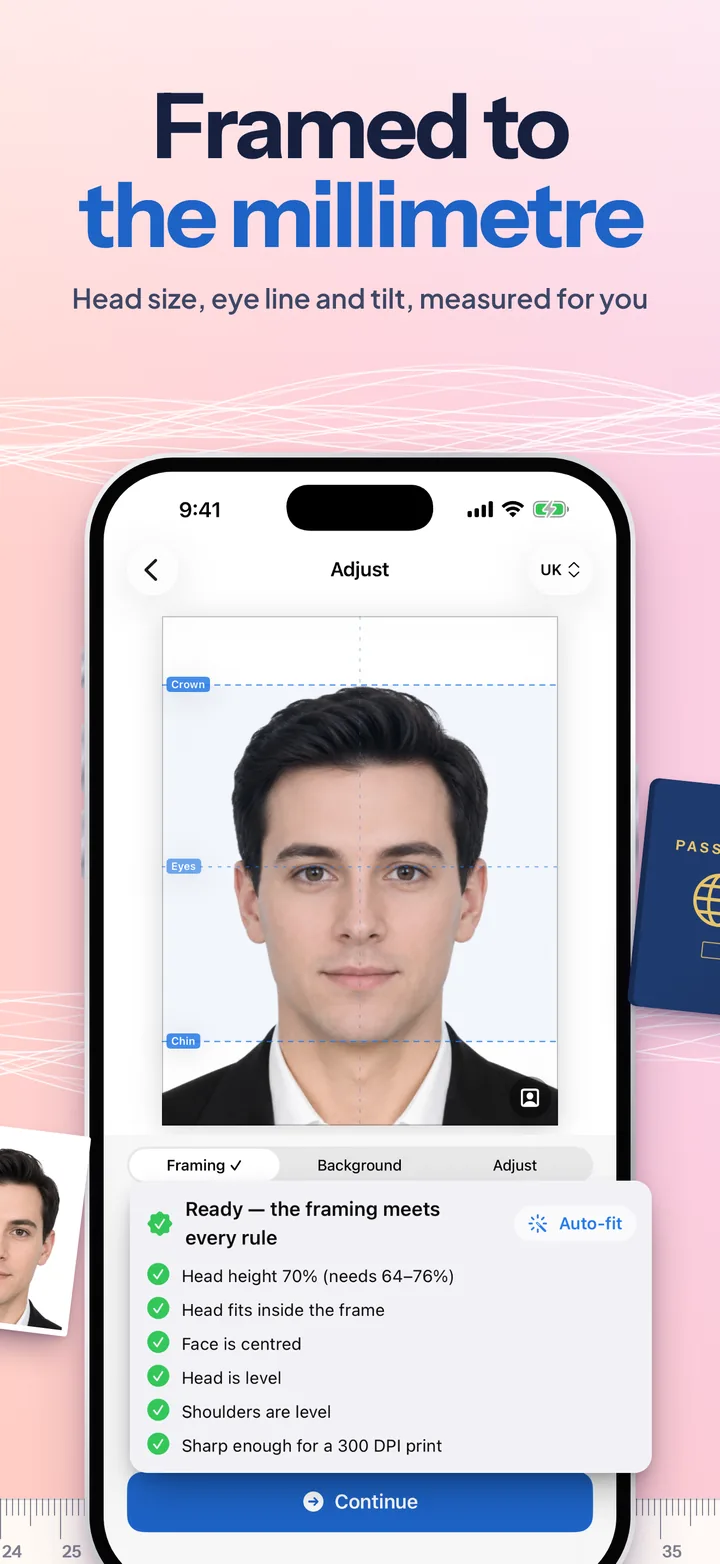
Framed to the millimetre: crown, eye and chin guides over the photo, with every framing rule ticked.
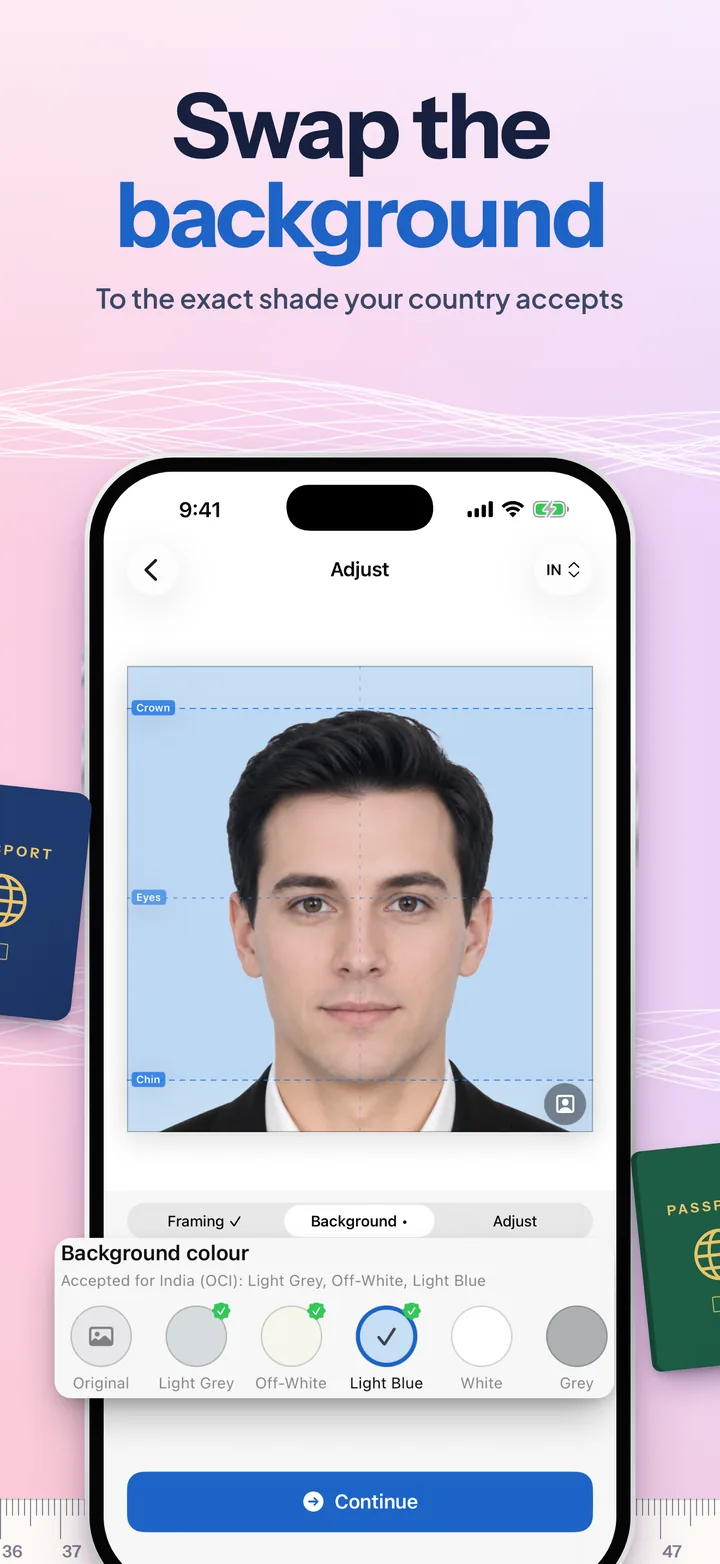
Swap the background: the photo on light blue for an India OCI card, with the accepted colours marked.
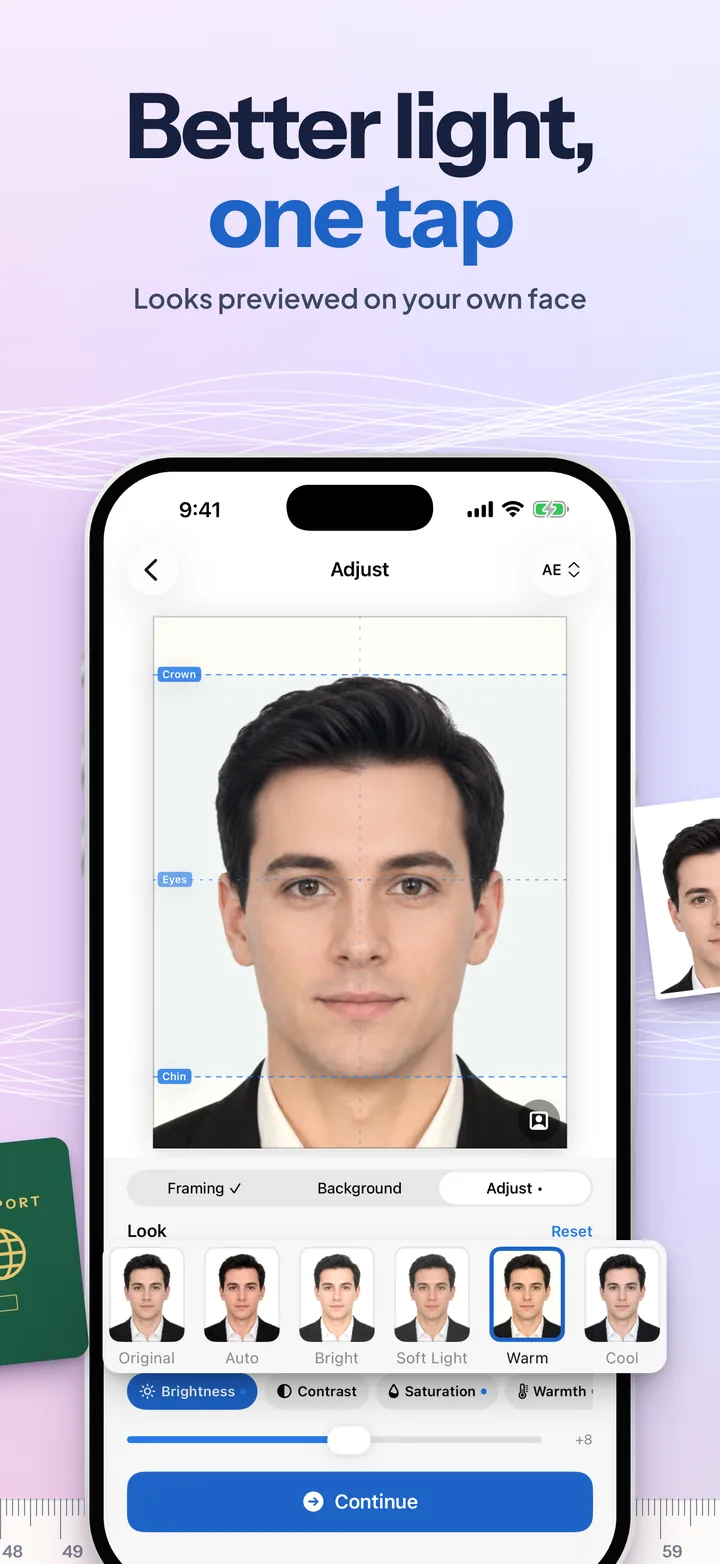
Better light, one tap: light presets previewed on the face, with Warm selected.
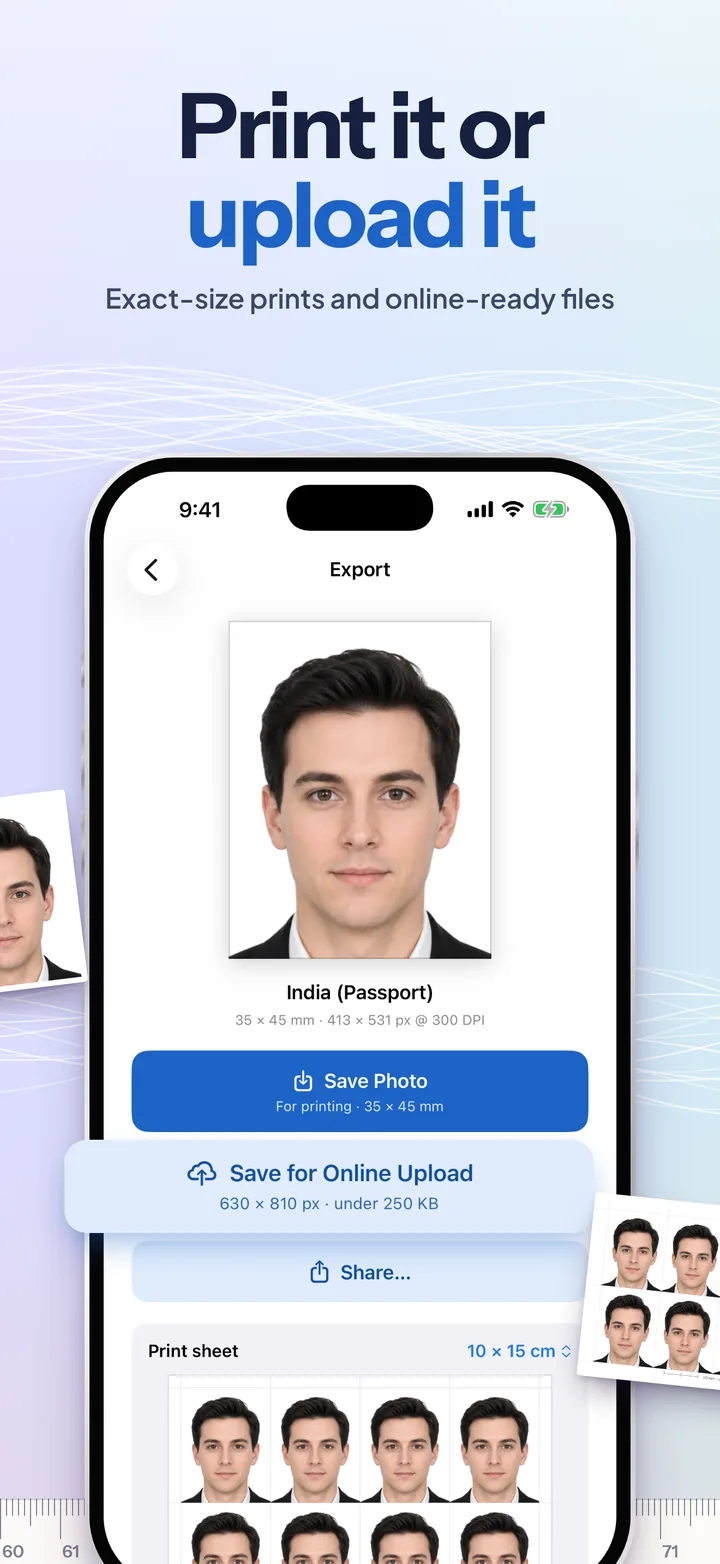
Print it or upload it: the finished India passport photo with Save Photo and Save for Online Upload at 630 by 810 pixels under 250 KB.
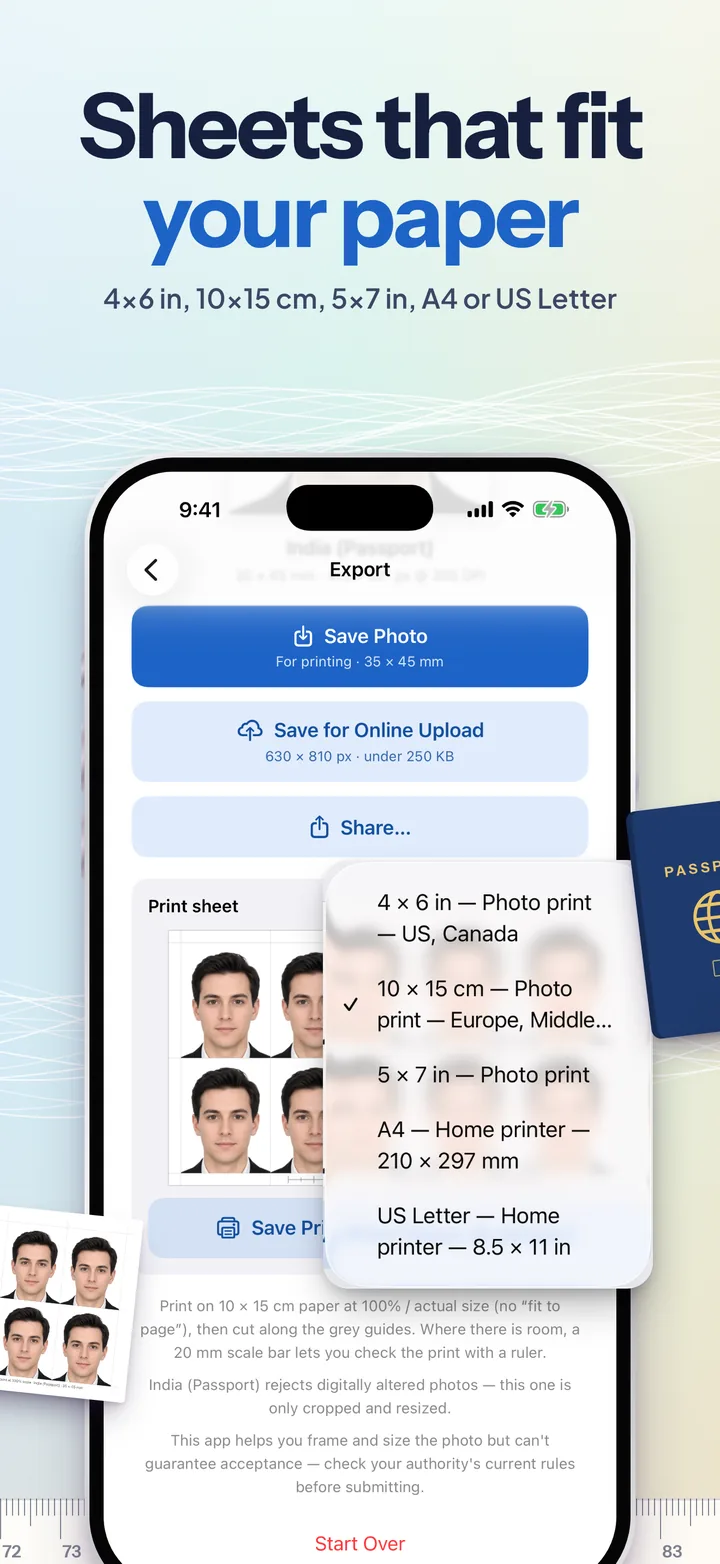
Sheets that fit your paper: a 10 by 15 cm sheet of eight photos, with the paper menu for 4 by 6 in, 10 by 15 cm, 5 by 7 in, A4 and US Letter.
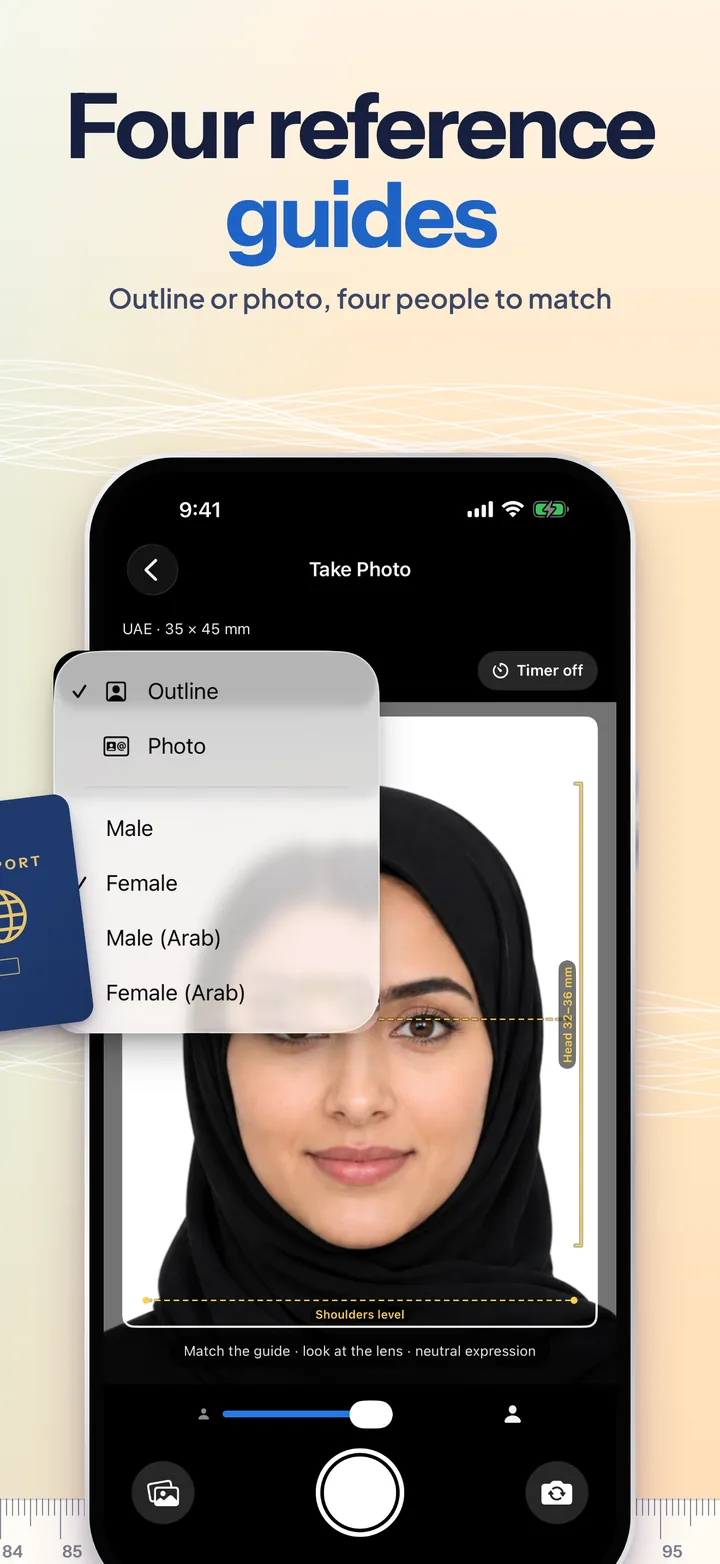
Four reference guides: the photo guide of a woman in a hijab for a UAE photo, with the menu of guide styles and the four reference people.

Swipe or scroll sideways: each panel picks up where the last one ends.

Key Features

  • Outline Pose Guide

    A reference person drawn as lines over the camera: head, face, neck and shoulders, with an eye line, a shoulders-level line and a head-height bracket. Switch to the photo guide, and choose from four reference people.

  • 28 Verified Formats

    Passports, visas and online uploads across the Americas, Europe, the Middle East, Africa and Asia-Pacific, each checked against the issuing authority's published rules. Search by country, alias or size, or set a custom size.

  • Head-Size Auto-Fit

    The crown is measured from the top of your hair and the chin from the jaw line, then the crop lands your head, eyes and top margin inside the official ranges. Pinch and drag to fine-tune.

  • Live Compliance Check

    Head height, head inside the frame, space above the head, centring, head level, shoulders level, eye height and print sharpness, each ticked off as you adjust.

  • Any Background Colour

    White, off-white, light grey, grey, cream, light blue, sky blue, blue and red, with the colours your format accepts marked first. Or pick any colour at all.

  • Better Light, One Tap

    Seven looks, previewed on your own face: Original, Auto, Bright, Soft Light, Warm, Cool and Crisp. Fine-tune brightness, contrast, saturation, warmth, shadows, highlights and sharpness.

  • Print Sheets That Fit

    Lay the photos out for 4 × 6 in, 10 × 15 cm, 5 × 7 in, A4 or US Letter, with cut guides and a 20 mm scale bar so you can check the print came out at actual size.

  • Stays on Your iPhone

    No accounts, no servers, no analytics. Face detection, segmentation and every edit run on the device; photos are saved only when you tap Save.

Read moreShow less

More

  • Online-ready files. Where a portal publishes pixel and file-size limits, the export renders a second file to match: 630 × 810 px under 250 KB for India, 600 × 600 px under 240 KB for the DV lottery, 1200 × 1200 px for US visas and renewals.
  • Uncropped original. GOV.UK crops online photos itself, so UK exports include the untouched original too.
  • True resolution. Prints are 300 DPI with the resolution written into the file, and the check warns if you have cropped in so far that the print would be soft.
  • Pose checks. Head tilt is measured from your eyes and shoulder tilt from your outline, and either one is flagged before you print.
  • Self-timer. 3 or 10 seconds, with ticks, a shutter sound and flash, and a cancel button.
  • Front or back camera, or import any photo from your library.
  • Change format later. Switch the document on the edit screen and the crop reframes itself for the new rules.
  • Requirements checklist. Pose, lighting, clothing, glasses and background tips in one place.
  • Sound and haptics. Each switchable from the menu.
  • iPad, in any orientation, with photos that always come out upright.

Every shape of photo

A few of the 28 formats, drawn to scale with the head where each authority wants it.

35 × 45 mmHead 32 to 36 mmEU · Schengen · UAE · Japan · Australia
2 × 2 inHead 1 to 1⅜ in · eyes 56 to 69%United States · India visa
50 × 70 mmHead 31 to 36 mmCanada passport
33 × 48 mmHead 28 to 33 mm · top 3 to 5 mmChina
40 × 50 mmHead 32 to 36 mm · blueKuwait
40 × 60 mmHead 32 to 36 mmSaudi Arabia · Egypt
50 × 60 mmFace 32 to 36 mmTurkey
3 : 4 digitalClear gap, shoulders in viewNew Zealand · Nigeria online

Plus the UK (head 29 to 34 mm), India (face 80 to 85%), Russia, Singapore, Pakistan, Jordan, Lebanon, Iraq, Morocco, South Africa, the DV lottery and more, and any custom size.

App Information

Quick facts about Passport Photos for iOS

Developer
CS42
Availability
Coming soon to the App Store
Price
Free
Category
Photo & Video
Compatibility
iOS 17.0 or later · iPhone & iPad
Languages
English
Age Rating
4+
In-App Purchases
None
Account
None needed
Data Collected
None
Formats
28, plus any custom size
Works Offline
Yes. Everything runs on the device

Support

Need help with Passport Photos?

Passport Photos isn't on the App Store yet. To hear when it is, leave your email in the launch form above. If you'd like a country added, or have a question, reach out to us. Telling us your iPhone model, iOS version and the format you picked makes it much faster to help:

View FAQHide FAQ

Will my photo be accepted?

The app frames and sizes the photo to the authority's published numbers and checks the framing rule by rule, which is where most home photos fail. What it can't judge is everything else a reviewer looks at: an even background, no shadows, a neutral expression, eyes open and clearly visible, and a recent photo. Follow the requirements checklist in the app, and check your authority's current rules before you submit.

How do I use the outline guide?

Stand in front of a plain wall, hold the phone at eye level about an arm's length away (or better, have someone take it from 1 to 2 m), and move until the top of your hair meets the top of the yellow head bracket, your eyes sit on the eye line and your shoulders run along the shoulders-level line. The guide is scaled to the format you picked, so it changes as you change country. Use the menu at the top of the camera to switch between the outline and the photo guide, or choose a different reference person.

Can I change the background colour?

Yes. On the edit screen, open the Background tab and pick a colour: the ones your format accepts are marked with a green badge, and Custom opens a colour picker for anything else. Be aware that many passport authorities, including the US, UK, EU, Canada and Australia, say they reject photos with an edited background, and the app warns you when that applies. A real plain wall is always the safest choice.

What do the Adjust presets do?

They correct the light, not the face. Auto balances exposure and colour, Bright lifts a dim indoor photo, Soft Light eases harsh light and face shadows, Warm and Cool counter bluish daylight or yellow bulbs, and Crisp adds a little definition. Each is previewed on your own face, and the sliders fine-tune from there. Keep changes light so the photo still looks exactly like you.

How do I print the photos?

On the export screen, choose the paper you'll print on (4 × 6 in, 10 × 15 cm, 5 × 7 in, A4 or US Letter) and save the print sheet. Print it at 100% or "actual size", never "fit to page", then cut along the grey guides. Where there is room, a 20 mm scale bar on the sheet lets you check the print with a ruler. A 4 × 6 in sheet printed on 10 × 15 cm paper comes out about 1.6% small, which is why the paper choice matters.

How do I submit a photo online?

If your format has one, use Save for Online Upload: it is rendered to the exact pixel size and file-size range the portal asks for, such as 630 × 810 px under 250 KB for Indian passport applications abroad. For UK online applications, upload the uncropped original, because GOV.UK crops the photo itself. The DV lottery, Saudi eVisa, New Zealand and Nigeria formats are digital-only, so their main photo is already the upload file.

Why does the checklist say my head is tilted?

Head tilt is measured from the line through your eyes, and shoulder tilt from your outline. Authorities want both level. A crop can't fix a tilt, so retake the photo facing the camera squarely, with the phone held level.

My country isn't in the list.

Use Custom Size at the bottom of the format list and enter the width and height in millimetres. The head size then follows the international ICAO rule of 70 to 80% of the photo height. Email us the country and a link to its official photo rules, and we'll add it.

Does the app upload my photos?

No. There are no accounts and no servers. Face detection, segmentation and edits run on your iPhone, and photos go only where you save or share them.

Does it work on iPad?

Yes, in any orientation. Photos taken with a turned iPad still come out upright.

We typically respond within 48 hours.